
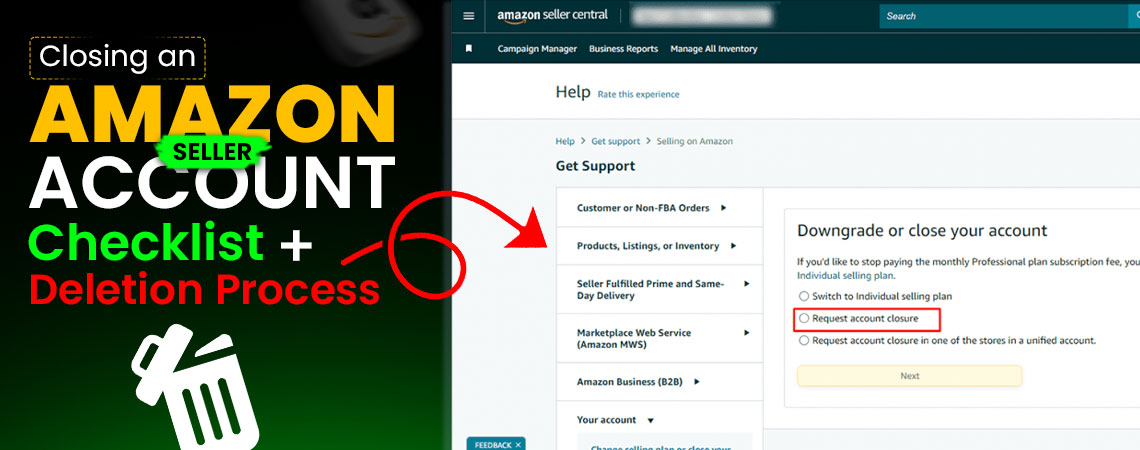
How to delete Amazon seller account
Selling on Amazon can be a rewarding journey for many entrepreneurs, but not every seller wants to keep their account forever. Sometimes your business goal shifts, and other times managing inventory or fees becomes overwhelming, and sellers think of deleting their accounts. Before you delete your account, it is important to understand that this isn't like pausing a social media profile. It's a permanent action that erases your selling history, listings, and removes future access. Amazon requires you to complete several tasks before closure, like fulfilling outstanding orders, resolving customer issues, and bringing your balance to zero.
Lack of sales is one of the biggest reasons sellers look into how to delete an Amazon seller account. If your selling strategies aren't working and your products aren't gaining visibility, the problem isn't in the platform; it's in the approach you're applying. If your main reason for leaving is slow sales and a lack of growth, before deleting permanently, think about consulting a full ecommerce agency, where they offer affordable pricing, and you get a dedicated account manager who works fully within your niche. This means you'll have someone focused on optimizing your product listings, running effective advertising campaigns, and improving your store's visibility. In many cases, the right professional help is enough to turn a struggling account into a profitable one.
 Understanding Amazon Seller Closure
When sellers think of deleting their Amazon account, it's important to know what deleting an account on Amazon means. There are different options:
Downgrade to an Individual Account: If you have a professional plan and you don't want to pay $39.99 monthly subscription fee, you can switch to the individual plan. Your account will remain active, but without the subscription.
Temporary Deactivation: You can keep your listing in vacation mode or deactivate it so customers can't purchase your items. You can choose this when you think of taking a break.
Permanently Closing: This is the final option, where your account, sales history, and data are permanently deleted.
If you are sure you'll never return to selling on Amazon, then you should know how to close your Amazon account to avoid issues later. But if you think you might return later, then deactivate your account.
Things to Do Before Deleting an Amazon Seller Account
When sellers think of deleting their Amazon store, Amazon won't let them close their account if they have pending issues. To avoid delays, you should prepare by completing the following tasks:
Resolve Orders: If you are using FBA and Amazon handles the shipping, you still need to make sure there are no pending or unshipped orders in your account. Any orders, whether FBA or FBM, must be completed before closing your account.
Handle Returns and Refunds: Buyers request returns, which is the toughest part of an e-commerce store, so process them before closure.
Clear Your Balance: Amazon requires that your account be $0. If you owe fees, pay them. If Amazon owes you disbursements, wait until the transfer is complete.
Download Your Reports: Once you close your account, you'll lose access to all sales, history, tax reports, and customer communication. Save these documents for your records.
Remove Your Inventory: If you use FBA, request that Amazon return your products or dispose of them.
Cancel Services: Disconnect any linked software tools or services tied to your seller account.
How To Delete a Seller Account on Amazon
Log in to Seller Central
Head to Amazon Seller Central and log in with your seller credentials.
Verify Your Account Health
Go to the performance section and ensure your account doesn't have unresolved performance notifications, A-to-Z claims, or policy violations. If you have any of these, resolve these issues.
Check Your Account Balance
You can check this by going into the payments tab. Confirm that your balance is zero. If Amazon owes you money, wait until it's disbursed. If you have any pending fees to pay, pay them.
Remove Listings
In the inventory tab, delete all your product listings. If you use FBA, create removal orders for all inventory stored at Amazon warehouses.
Submit a Closure Request
Once your account is clean:
- Click settings (top right corner).
- Select account info.
- Scroll to the account management section.
- Click close account.
Amazon can ask for additional confirmation via email.
Wait for Confirmation
Amazon takes a few days to review your request. If there are no issues, your account will be permanently closed, and you will lose access to Seller Central.
Alternative Options Instead of Deleting the Amazon Seller Account
Deleting is permanent. If you are unsure, here are some alternatives that will give you flexibility if you are not 100% sure of selling on Amazon. Many sellers search for how to delete seller account on Amazon before realizing there are alternatives. A few use these options when sales are slow or they're reevaluating their business model. It gives them time to decide whether they want to return with a new strategy, new products, or to consult an agency to grow.
Downgrade to an Individual Plan
When your sales are low, sellers don't want to pay the monthly $39.99 for the professional plan fee, which feels like a burden because they're paying Amazon more than they're making. This is one of the reasons many sellers start thinking about shutting down their accounts.
But if fees are the main issue and you want the option to sell, you don't have to delete your account. You can downgrade to the Individual plan. With this option, you will not pay the monthly subscription fee, but you'll be charged $0.99 per item sold.
Vacation Mode
Sometimes you need a breather. Maybe you're overwhelmed with the day-to-day, going on a trip, or want to step back without losing your hard work. In this case, you can use vacation mode.
When you turn on vacation mode in Seller Central, your listings are temporarily hidden from Amazon's marketplace. Customers can't place new orders, but your account stays active. You don't have to go through the hassle of permanently closing your seller profile. It's like pressing "pause" instead of "delete."
Deactivate Listings
Another option is deactivating your listings. If you're not ready to pay ongoing fees for inventory storage, advertising, or fulfillment, but you don't want to lose access to your Amazon account, this is a smart middle ground. By deactivating listings, your products will not show up to customers, and no new orders will come in. You'll have access to Seller Central, your reports, and your selling history.
If I Close My Account, Can I Come Back Later?
This is one of the first questions sellers think about before making the final decision: "If I close my account now, can I reopen it later?"Once you permanently delete your Amazon seller account, you can't reopen the same account again. Amazon treats it as a final action; your selling history, listings, and data are wiped out. If, after a few years, you decide to return to selling, you can create a new seller account.
If you think there's even a chance you'll want to sell again in the future, then you should pause your account (with vacation mode, listing deactivation, or downgrading) instead of closing it permanently. That way, you keep your selling history intact and can pick things back up without starting over.
There are some important things to keep in mind:
Documents and Personal Details: You can use the same personal information, documents, and bank account details to register again. Amazon doesn't ban you from the platform if you close your old account.
Fresh Start: You'll be starting from scratch. There will be no reviews, no sales history, and no performance metrics to give you an edge.
Amazon's Approval Process: You'll need to go through the verification process by uploading documents, proving your identity, and setting up your payment info.
Linked Accounts: If you had multiple accounts in the past that were linked (for example, selling in different regions without Amazon's permission), this could cause problems when trying to open a new one.
Rachel's Experience of Growth with SpectrumBPO
Recently, we had a seller who was selling pet accessories. She had been selling on Amazon for over a year but wasn't seeing the results she hoped for. Instead of making profits, she was dealing with:
- High FBA storage fees were eating into her margins.
- Because of poor product visibility, her listings were buried on page 6 or 7 of search results.
- There were low conversion rates because her product descriptions and images weren't optimized.
- The advertising campaigns she was doing were draining her budget without bringing in sales.
Every month, she was paying Amazon more in storage and ad fees than she was earning from sales. At some point, she thought Amazon wasn't for her, so she was asking how to delete a Amazon seller account to one of her neighbors, William, who was working in e-commerce for many years and was our client.
She went to him, and he noticed her struggle and suggested she should give it one last chance. Melia then came to our Amazon FBA agency for a try. At first, she felt she had done everything possible. When she came to us, we started with
Identifying the Problems
When we reviewed her account, here's what we found:
- Listings were not optimized for keywords, and the titles and bullet points weren't targeting what buyers were searching for.
- She was using poor product images, uploading the photos that weren't professional, buyers weren't trusting, and there were very less conversions.
- She was running broad match PPC campaigns without negative keywords, burning through her budget.
- She had slow-moving inventory that was costing her FBA storage fees every month.
- Her product blended in with competitors instead of standing out, so there was no brand positioning.
The Strategy We Applied
Here's how our dedicated account manager, who focused on her niche, helped:
- Rewrote her titles, descriptions, and bullet points by using keywords that were specific to her niche and high-converting.
- Updated her product images and added A+ Content to build trust and show the value of the product by adding lifestyle shots.
- Our ppc management experts designed targeted ads and tracked ROI to keep track of the invested budget.
- Created a plan to move slow stock with small discounts and promotions, reducing storage fees quickly.
- We helped her highlight her unique selling points by making her product stand out from her competitors.
The Results
Within 60 days, her store started giving good results:
- Her listings moved from page 6 to page 1 for several key search terms.
- She was able to double her conversion rate after the listings and images were optimized.
- Ad spend was cut by 35%, while sales from ads increased by 60%.
- FBA storage fees dropped after we helped her clear slow-moving inventory.
- She went from losing money every month to generating a good profit margin.
Today, she is selling and scaling her store on Amazon with confidence. It started because she took her neighbour's advice and gave us a chance to manage her account. So, if you think of deleting your Amazon account permanently, you should let a team of professionals handle it and give it some time to get good results, before you think of stop selling on Amazon permanently.
Share this Post




Blog Categories
Uncategorized
