
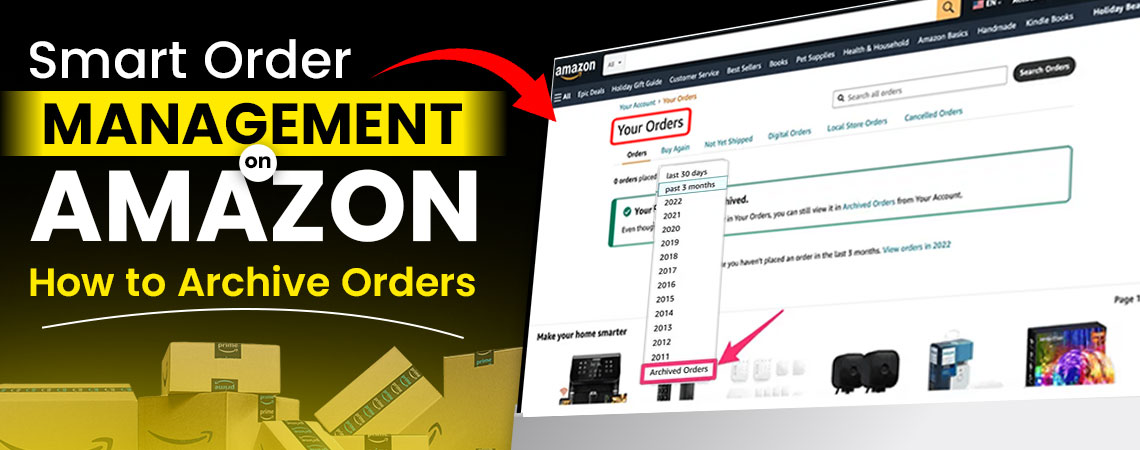
How to Archive Amazon Orders
Effectively managing your Amazon orders is important for dedicated personal on-line shoppers and established business sellers. When you know how to archive Amazon orders, it saves time and keeps order history organized. Once archived the completed orders still exist, but are hidden from view, which allows you to access information later, if needed.
The process is easy, simply by going into the orders section, going to completed deliveries and selecting the utilize Amazon archive function. Once you also understand how to see archived orders on Amazon, you'll be able to obtain purchase information when required. This systematic process allows you to keep your dashboard from clutter, increase response time and keep to a more professional standard in your business practices.
Understanding how to archive an Amazon order is also important when undertaken to manage seller accounts. When you archive Amazon order entries they reside in a different location that is available for customer service, tax preparation and/or business related analysis. Knowing how to archive an order on Amazon can be an important factor for high-volume sellers.
 Understanding Who Needs Order Archiving
Many new Amazon sellers do encounter order management issues as their business grows. New sellers do not have to manage many orders at the start and, tracking orders manually is a manageable activity with a smaller volume of sales. As their sales volume increases, new sellers quickly learn how to manage orders and can value proper management of orders. Order management is an important learning exercise for new sellers when it comes to archiving an Amazon order so that a proper habit can be established early in their seller record. Knowing how to archive Amazon orders can be a core building block for building an organized and scalable seller operation.
For established Amazon sellers, archiving Amazon orders can take on a different context. An experienced seller will likely have hundreds to thousands of orders to manage on a monthly basis. These sellers have developed systems that allow them to effectively track completed orders, return orders, and preserve a clean seller dashboard. Experienced sellers understand that knowing how to archive an order on Amazon is simply an important part of keeping organized seller accounts and maintaining acceptable customer service. Established sellers will need to archive Amazon order entry in bulk more regularly to maintain seller efficiency.
Finding Official Resources for Order Management
Amazon has various official places to archive orders. The main places are in the help pages of Amazon Seller Central, which contain detailed documented processes for managing orders. The Amazon Seller app can allow you the mobile version of your order archiving process to archive Amazon orders you have taken from the Amazon selling platform.
If you have more comprehensive account management needs, professional services like those offered by full ecommerce services can help you on the order bureaucracy and seller account optimization.
Step-by-Step Process for Archiving Orders
Understanding how to archive Amazon orders only requires following a few simple steps that anyone can learn with practice.
First, go to Amazon.com and log into your account. Then, select "Your Orders" from the account information options. This area allows you to see all of your most recent orders in chronological order.
Now you need to find the specific order you want to archive. Look for orders that indicate they were "Delivered" or "Completed" as those are the orders able to be archived. Click on order details to see order activities.
Look for the "Archive Order" button typically located next to "Track Package", "Return Items" and other order options. After clicking the order, it should automatically place it in your archived orders folder. You will receive a notification message confirming you archived an order.
To see archived orders on Amazon, navigate to archived orders section in your account. This section will show all of your past archived orders in its separate area and make all archived orders easy to reference in the future. Archived orders can be searched by date, product name or order number. When you want to see archived orders on Amazon for your business purposes, managing orders correctly can save your considerable amount of time.
The archiving process is similar for sellers completing customer orders. Seller Central has bulk archiving options to help sellers manage multiple orders at a time. This feature is very useful for those managing large volumes of orders and learning how to archive Amazon order entries quickly and efficiently.
Expert Motivation Behind Order Management
As an Amazon optimization expert, I have gone through thousands of sellers with a messy order process. Bad order processes can lead to a bad customer service experience, missed opportunities, and poor operational execution. This is what motivated me to help sellers understand how to archive orders correctly.
Based on my experience working with sellers from all over and of all various types of businesses, I saw patterns, specifically new sellers are typically messy when it comes to organizing orders, until they realize they have a problem and established sellers generally do not have processes in place around order management. Nevertheless, in either case they would have benefited tremendously from understanding how to archive an Amazon order.
When sellers start to have volume, it makes sense to leverage professional services to manage their Amazon account. In fact, a professional Amazon agency can be critical for sellers once their annual volume reaches a certain threshold. The best part about professionals helping with an account is that they know how to properly archive orders, track them, and run a successful Amazon business.
Common Challenges in Order Archiving
Sellers face many challenges when attempting to archive Amazon order entries appropriately. Awareness of these challenges ultimately helps with preparation.
One of the major challenges was volume management. High-volume sellers typically sell hundreds of orders daily, making manual archiving very difficult in a passive manner without strategic methods. These orders become hard to find later even if you know how to see archived orders on Amazon.
Technical limitations create another challenge. There are times when Amazon's interface lags, or even fails, while archiving orders. Reports from sellers indicated that orders would seem to successfully archive, but still remain present in the active orders lists creating a mismatch of understanding as to how to archive an order on Amazon.
Integration issues arise when sellers attempt to use third-party tools with Amazon's inherent native archiving mechanism. Some archived orders are not tracked properly through differing platforms (or systems) at times resulting in confusion around statuses for the orders. Once sellers had a way to fulfill or send customer service related functions with those orders (from "Once and Order" which was shown in a previous lesson) learning how to see archived orders on Amazon becomes complicated when you are dealing with many systems.
Lastly, customer service implications create challenges. Archived orders are treated like active orders in the sense that archived orders still have a customer service responsibility. Sellers want to maintain access to archived order details for purposes of returning product reimbursements, customer inquiries, and so on regardless of whether sellers knew how to archive Amazon orders properly.
Solutions for Overcoming Archiving Challenges
Effectively navigating volume management troubles involves structured approaches. Following routine archiving schedules are an excellent way to keep on top of your large quantity of orders in an organized manner. Some successful sellers routinely set aside time each week to archive completed orders in a batch-like manner.
Often times, addressing technical issues may only require optimizing your browser and clearing cache files. Using the latest version of a browser as well as a stable internet connection can promote a greater than 70% reduction in archiving errors. If you are unable to identify a solution, contacting Amazon support is also a way to technical support.
For any integration problems, choosing the right third party tools is upmost important. Services like SpectrumBPO, a professional services offering Amazon listing agency, employ integrated solutions that complement Amazon's archived system without creating separation.
Summary of Key Archiving Points
Successfully learning how to archive Amazon orders involves knowing the basic archiving procedures with Amazon's interface. This includes:
- Going to your orders section, clicking on completed orders, and using the archive feature.
- Developing a solid understanding of how to archive Amazon orders takes practice and knowing the limitations of Amazon.
- It is important to remember that archived orders are still searchable, accessible and configurable.
- The archive Amazon order feature does not erase order detail but takes completed orders out of main views.
- When you routinely need to archive Amazon order entries, using systematic approaches saves a lot of time.
- Regular archiving schedules allow for preemptive order management, and prevents order management problems before they start.
- Understanding how to archive an Amazon order comprehensively, provides you the tools and solutions to keep a clean, professional looking account.
Benefits and Importance for All Sellers
Archiving orders in a proper order helps new sellers and existing sellers immediately. For new sellers, you'll have a valuable organizational framework that opens doors to growth and development of your business. When new sellers establish a good order archiving mentality, you are less likely to encounter management issues down the road or create any environment outside of your professional organization.
Existing sellers can expect improvements in efficiency and decreased desire to perform administrative functions when archiving orders is the norm. Everything is streamlined in a clean order dashboard allowing for much quicker and easier access to active orders. Your efforts to create a better archival process will be reflected in your customer service response times and operational error rates.
For new and existing sellers that have active and layered order management challenges, booking professional Amazon advertising agency will also take these aspects into consideration as part of a complete solution that include order management aside from just encouraging click value.
Archiving orders also allows sellers to focus on other vital business functions such as tax preparation or other requirements to fulfill financial reporting and performance reporting since you now have the knowledge of how to see archived orders on Amazon to ascertain that once critical data is preserved and available to you when you need it.
Professional Amazon Management Services
Confused, still? Have no fear! SpectrumBPO provides full Amazon account management solutions that will encompass and perform any/all seller account optimization work and management tasks for your marketplace.
Our team knows the complexities of how to archive an order on Amazon and provide systematic solutions for business owners of all shapes and sizes. Our services involve account optimization, order management and performance monitoring. We understand how to manage it all, from basic archiving processes to complex multi-channel integrated order systems. Our professional Amazon sellers will help you with every Amazon pending order or taking full control over a list of orders to provide complete account management. We will work with you as experts on how to archive an order on Amazon while continuing to support you to provide maximal opportunities for your business.
SpectrumBPO has a proven process and has helped thousands of sellers optimize their seller account operations. Our systematic approaches to order management and optimizing account archiving, ensure your Amazon business operates seamlessly and effectively. Contact us today to see how professional Amazon account management can change your selling endeavor.
Share this Post




Blog Categories
Uncategorized
