

Helium 10 extension
Selling on Amazon sounds exciting, but it can be overwhelming. You search for products manually on Amazon, check prices, look at reviews, and end up asking yourself, Is this product worth selling? Will it make a profit? Am I missing something my competitors are doing? Many sellers spend weeks or months trying to figure these things out, and then realize they have been chasing the product or ignoring the keywords that will drive sales. Amazon's success is to have the right data at the right time. This is where the Helium10 Chrome extension comes; it gives you real numbers and insights on the Amazon page.
You can see sales estimates, revenue, competition levels, keywords, and profit margins in a few clicks. The extension helps you stop wasting time on products that won't sell and gives you data on items that have potential. Many sellers spend hours doing manual research, checking products one by one, entering numbers into spreadsheets, and relying on data that isn't accurate. But by using Helim 10, they can have insights while browsing Amazon, which makes it less stressful, faster decisions, and smarter ways to grow their business. The data is presented in a way that makes it easy for new sellers to have an idea which product can give them a good profit margin.
 What is the Helium 10 Chrome Extension?
This is an extension that you can install in Google Chrome. Once installed, the tool works in the background smoothly while you browse Amazon. Instead of switching between tabs and spreadsheets, you can view sales data, revenue estimates, keyword insights, and the supplier results page or product listings. It helps sellers save time and provide actionable insights.
Why Amazon Sellers Need It
Amazon is a marketplace where trends shift daily. Picking the wrong product can cost thousands of dollars in unsold inventory and wasted advertising. Through the helium extension, you can:
- Get market validation, you can see whether a product niche has enough demand but not too much competition.
- You can get keywords by identifying what customers are typing into Amazon's search bar.
- Calculate potential margins before confirming your order with suppliers.
- Check competitor tracking, understand who dominates a niche, and what strategies they are applying.
Core Features of the Helium 10 Extension Chrome
Sellers use the extension of Helium 10 for:
Product Research
Finding the right product is challenging for Amazon sellers because of the competition. In Helium 10, there is a feature of Black Box, which gives you access to important data while you're browsing Amazon. With just one click, you can:
- See estimated monthly sales and revenue for any product.
- Check competition levels.
- Compare average price points and review counts to spot opportunities.
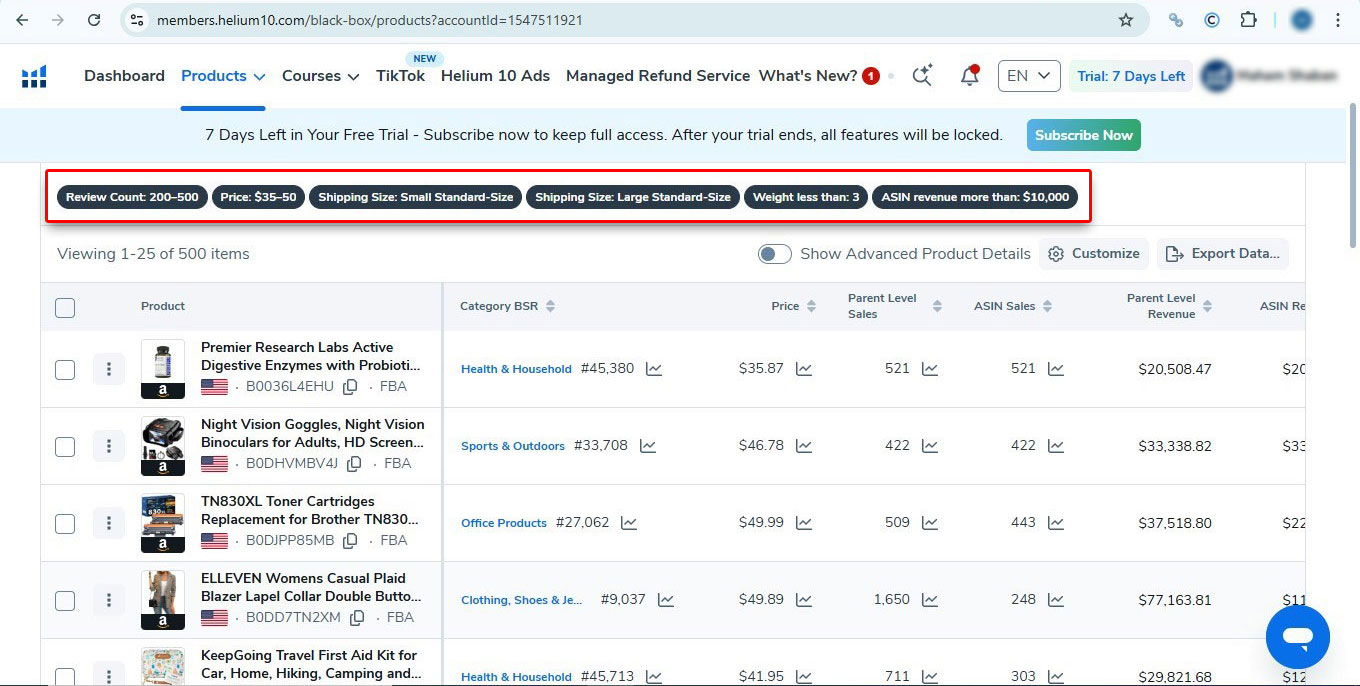
When you go to product research, it will ask you to set filters that match your product criteria like price range, review count, shipping size, weight, and monthly revenue. Once you enter these options, the tool narrows down Amazon's catalog and shows results that meet your requirements.
Just like in the picture below, after applying filters like price $35-$50, reviews 200-500, and revenue above $10,000, Black Box generates a list of products along with their category BSR, monthly sales, revenue, and other key data. The results help you spot demand with manageable competition.
Understand Your Margins
Selling a product without knowing your profit is risky. In Helium 10 Chrome extensions, there is a profitability calculator, which is used to estimate the profitability of a product before you launch. With this calculator, you can:
- Enter your expected costs (manufacturing, shipping, etc).
- It will factor in Amazon fees.
- Give you a view of the profit margin you'll make.
If you plan to sell yoga mats. By entering the numbers, the calculator will show you that after Amazon fees and shipping, your $25 selling price will leave you $6 profit per mat.
Review Insights
Through customer feedback, you can improve your products. Through review insight tool in Helium 10 makes it easy by analyzing reviews for you. You can:
- Spot common complaints customers have with competing products.
- Identify what people love so you can highlight it in your listing.
- Save time instead of manually reading hundreds of reviews.
If you're exploring selling electric kettles, review insights reveal that some customers complain about the handle getting too hot. That insight gives you the chance to launch a kettle with a heat-resistant handle, which will make your product attractive.
ASIN Grabber
This tool helps by collecting product IDs (ASINs) from search results, which you can use in a targeted ad campaign. This:
- Gather competitor ASINs in seconds.
- You can use them to create Sponsored Products ads.
- Focus your ad budget on proven, relevant products.
If you're selling fitness resistance bands, you can grab the ASIN of top-selling bands and run ads directly against them. In that way, your product will show up when shoppers are looking at products similar to yours, which will give you chances of getting clicks and sales.
Check Inventory Levels
Running out of stock on Amazon is a common problem, but it can harm your Amazon sales rank, which impacts visibility and sales. The tool tracks how much stock competitors have. This helps sellers identify opportunities when rivals are running low. With inventory levels, you can:
- Check competitor stock levels in real time.
- Spot gaps when others are out of stock.
- Plan your inventory better to avoid losing rank.
A seller selling AirPod cases sells 50 per unit per day but only has 120 units left. You know they'll run out of stock in 2-3days. This will give you a chance to increase ads during that window and take more sales while their product is unavailable.
Pros and Cons for New and Established Sellers
For New Sellers
| Pros | Cons |
|---|---|
| It's easy to start with the free version that gives useful insights. | Free plans have limitations, but a paid version can be tight on budget for beginners. |
| Helps avoid costly mistakes when choosing the first product. | Data feels overwhelming without having any experience with e-commerce before. |
| Gives correct data, which makes product validation less overwhelming. | Relying too much on data can cause analysis paralysis. |
| Gives step-by-step tools to complete your research for potential products before investing. | You'll need additional support (e.g, listing optimization, ad management, and design). |
For Established Sellers
| Pros | Cons |
|---|---|
| Advanced tools like keyword research and PPC optimization scale with growth. | Data is estimated and may not be enough for strategic planning. |
| Saves time by giving deep market and competitor analysis. | Paid plan costs can add up when combined with other Amazon tools. |
| Sellers can get detailed insights to improve product expansion. | Established sellers may have their own processes, which make adoption slower for them. |
| Strong for tracking competitors and staying ahead in saturated markets. | It can't replace human expertise, and only gives the same data to sellers. |
How You Can Install Helium 10 Extension
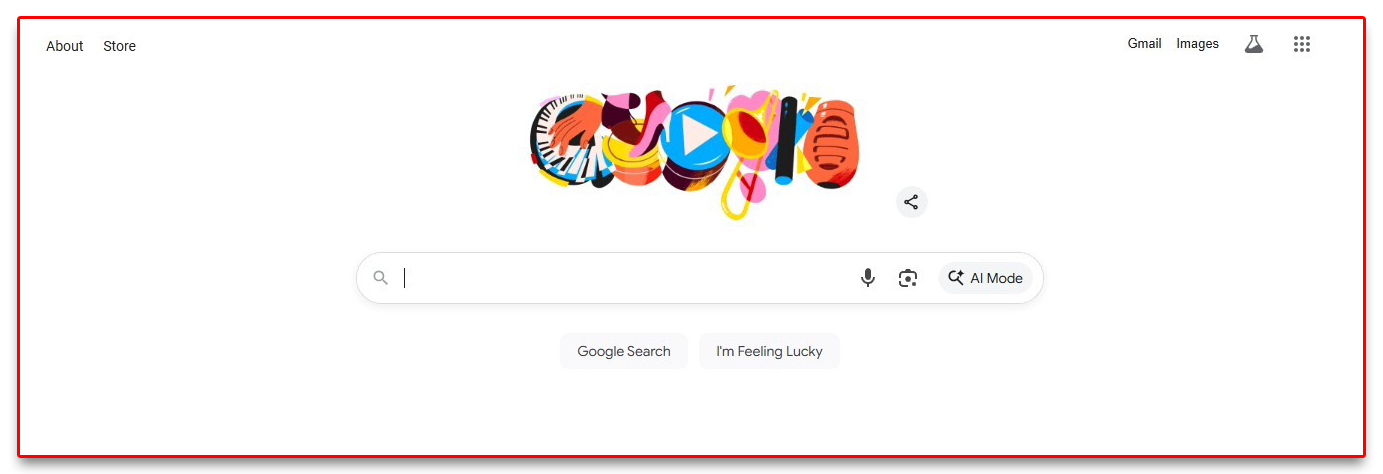
- Open Google Chrome on Your Desktop
Use Google Chrome on a laptop or desktop; the extension doesn't work on mobile apps.
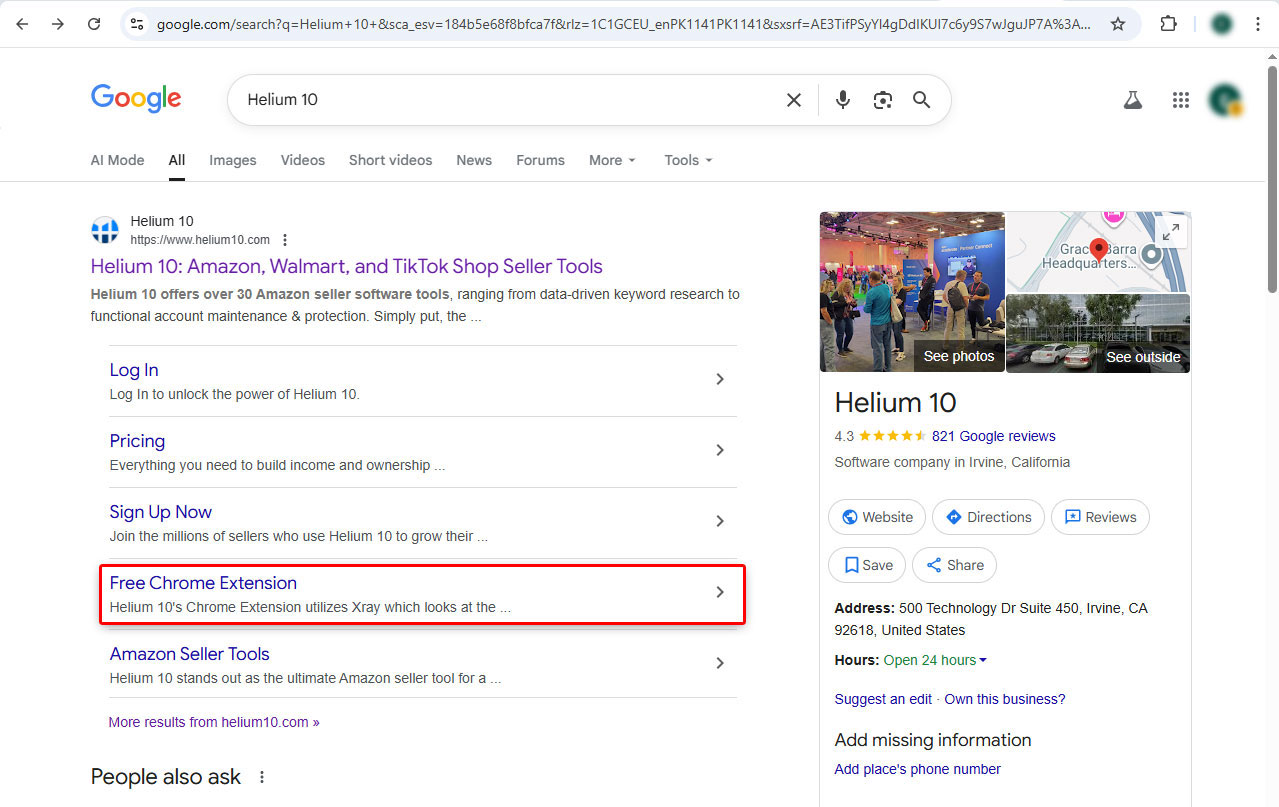
- Search for Helium 10
Type Helium 10 Chrome extension and press enter, look for the official Helium 10 extension in the results. It will give you an option to download. It will take 1-2 minutes to download.
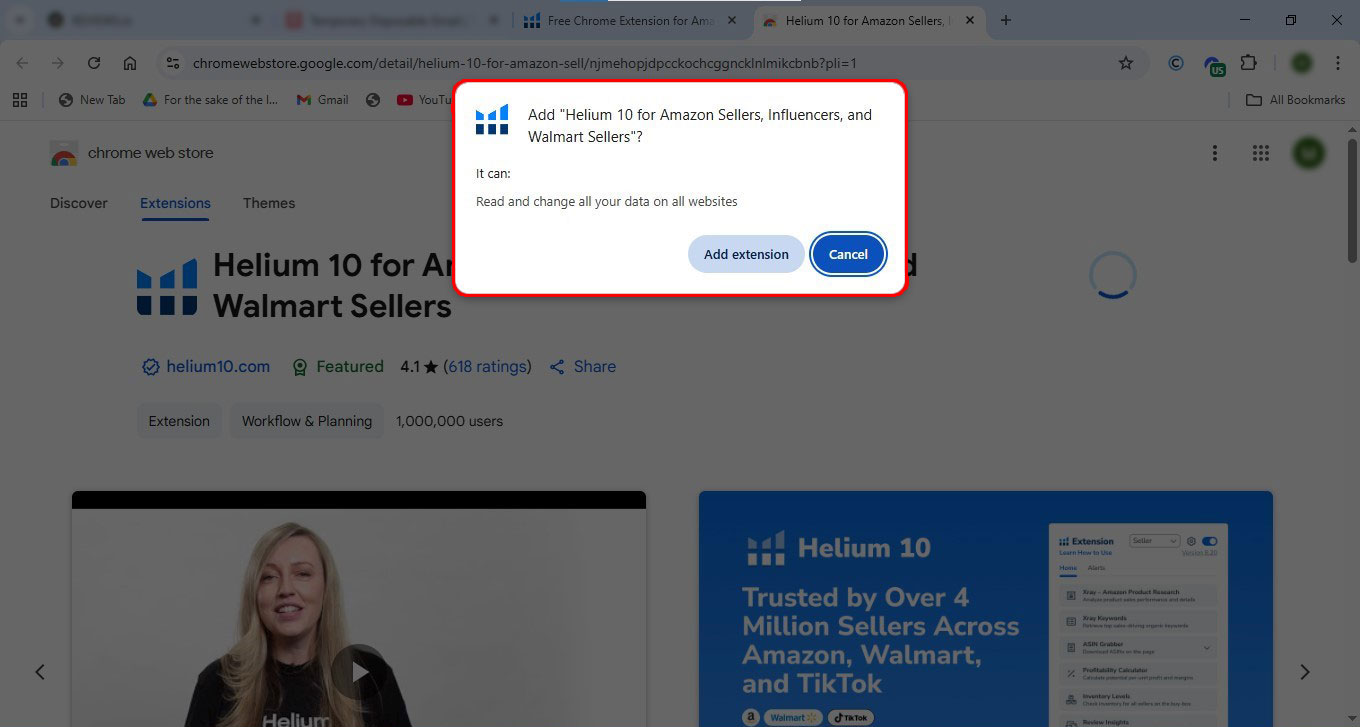
- Add to Chrome
Click the extension entry, then click Add to Chrome. A small pop-up will ask for confirmation. Click Add extension.
- Sign in
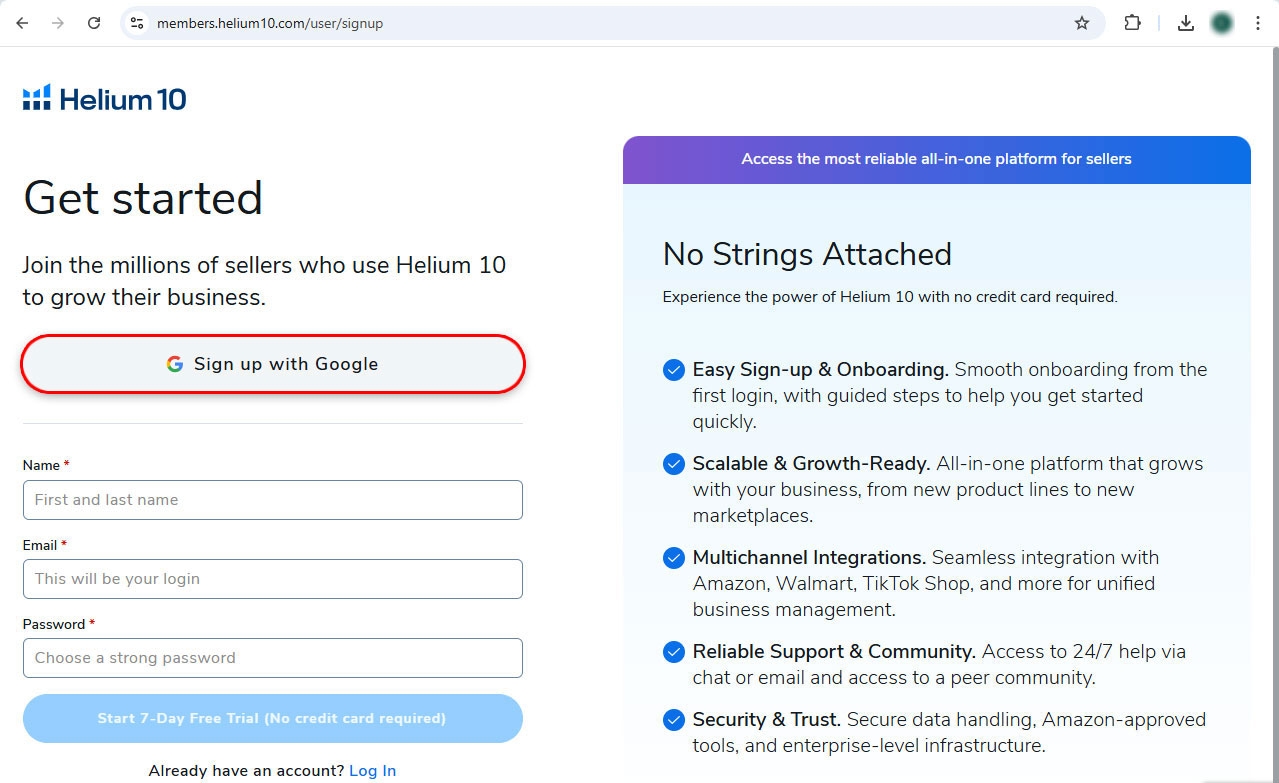
Click the Helium 10 icon, then Sign in. If you are new, register with your email and confirm the verification email, or you can sign up directly with Google.
- Allow Permissions
The extension will ask permission to read data on the websites you visit; it needs this to show Amazon data. Click Allow so it can work on Amazon pages. - Pin the Extension
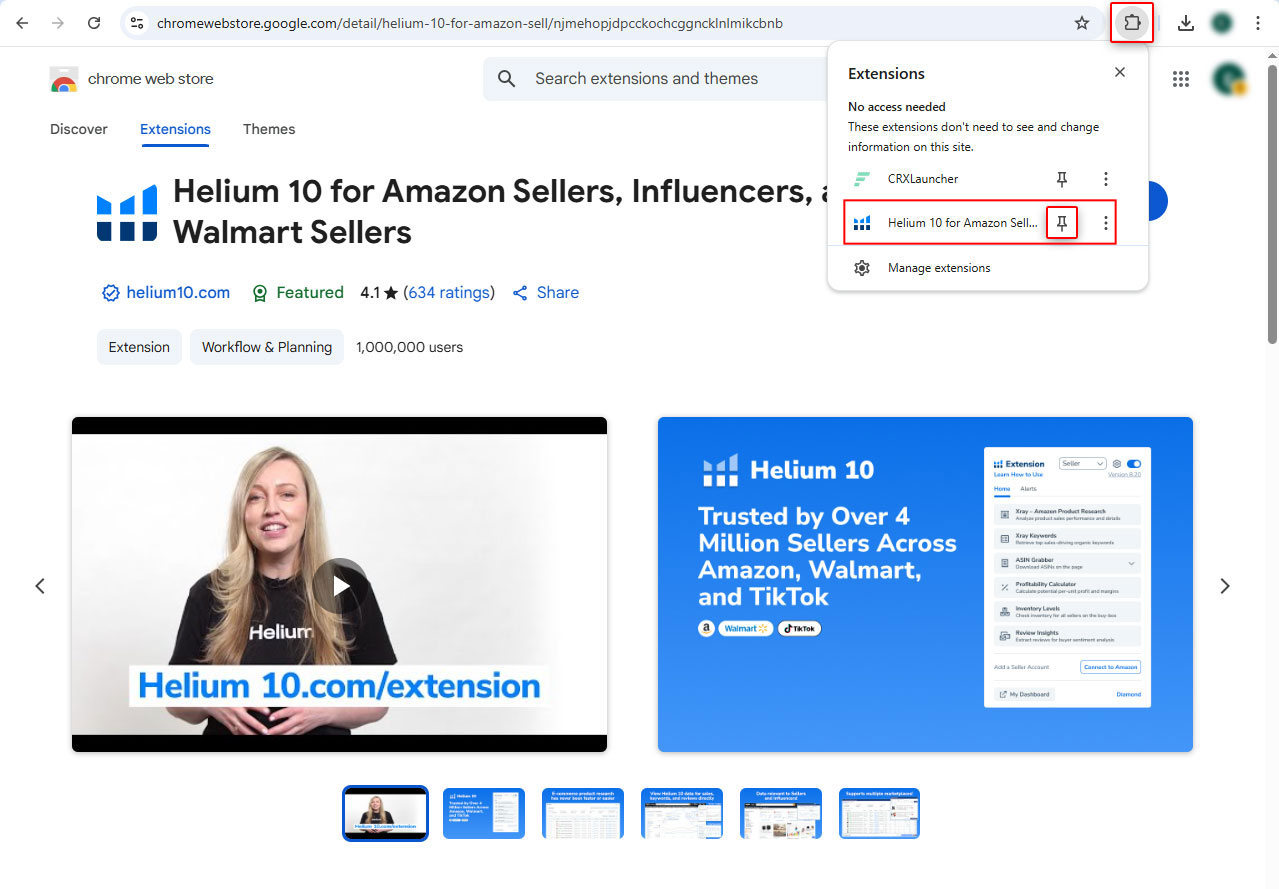
Click the puzzle piece icon in Chrome's toolbar, find Helium 10, and click the pin icon so the Helium 10 icon stays visible next to your address bar.
- Choose Your Marketplace
Open the extension and look for settings or preferences. Select the Amazon marketplace you sell on. You can add default costs for the profitability calculator so numbers match your business.
Helium 10 vs. Other Extensions for Amazon
There are other Chrome extensions for Amazon, such as Jungle Scout, Viral Launch, and AMZScout. When comparing Helium 10 vs SellerAmp, Helium 10 stands out for sellers who want more tools in one place. While SellerAmp is known for retail arbitrage and profitability checks, Helium 10 offers a broader ecosystem designed for FBA sellers. If you choose to upgrade, you gain access to full tools for keyword research, listing optimization, PPC management, and more in one extension.
Jungle Scout: This is known for strong product research features but requires a subscription.
Viral Launch: This focuses on keyword tracking and launch campaigns.
AMZScout: Budget-friendly alternative with decent data.
Do You Need an E-Commerce Agency if You're Using Helium 10?
The Helium 10 Chrome Extension is one of the best tools for Amazon sellers. It gives you data on sales, revenue, competition, and keywords. But with all this, many sellers find themselves stuck. Helium 10 tells you what's happening in the market. An e-commerce agency helps you decide what to do about it. Here's why sellers need agency support:
- Strategy: Helium 10 shows product opportunities and keyword insights, but it doesn't create a launch plan, optimize your listing, or manage ads for you. An agency can handle these tasks.
- Time Management: Running an Amazon business involves product sourcing, inventory management, PPC campaigns, listing optimization, and customer service. Tools save time on research, but agencies save time on execution.
- Expertise: Agencies work with multiple sellers and niches, so they know what works in practice. They can spot issues faster and implement proven strategies.
- Dedicated Support: Tools don't answer questions when you're stuck. A dedicated account manager or consultant can guide you through tricky decisions.
How We Helped at SpectrumBPO
One of our clients, David, came to us after trying to grow his Amazon business on his own. He was using tools like the Helium 10 Chrome Extension to research products and understand the market. The data looked good, and he had launched a product in the home office accessories niche. But with all the data, sales were slow. Like many sellers, David realized that while tools give you information, they don't create strategies, optimize listings, or manage ads. That's when he decided to take Full Ecommerce Services for his Amazon account management.
The Problems
David had chosen a good product, but wasn't able to generate sales.
His product listing wasn't bringing in clicks or conversions.
Ad spend was draining the budget because he was running ads without any strategy.
He was managing everything alone, which left him overwhelmed and unsure of the next steps.
How We Helped
- Assigned a dedicated account manager to handle his store personally.
- Optimized his listing with keywords that matched what buyers were searching for.
- Monitored his store performance daily and adjusted strategies.
- Through our Amazon advertising management, we build a strategy to run sponsored ads campaigns to improve visibility and ROI.
- Fixed the pricing, promotions, and inventory planning to stay competitive.
The Results
- Sales grew more than 3x within three months.
- His product moved from slow sales to a stable monthly volume.
- Advertising became profitable, generating positive returns instead of losses.
- David had peace of mind, knowing his business was in expert hands while he focused on growth.
Turn Insights Into Sales with SpectrumBPO
This extension gives you data; it doesn't give you a dedicated agent to manage your store, optimize your listings, and run your campaigns. That's where we, as a full Amazon agency, come in, where you get the team. We at SpectrumBPO assign you a dedicated e-commerce manager who handles everything from keyword optimization to PPC campaigns and your Amazon store management. Our plans start from $399/month, and before you make a decision, a 40-hour free trial is offered so you can see the difference yourself. We don't only provide insights, but we turn them into action. Let us handle the workload while you focus on scaling your business.
Share this Post




Blog Categories
Uncategorized
